
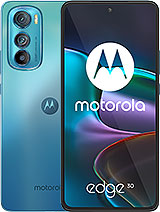
Motorola Edge 30 repair Amsterdam
Choose a repair for your Motorola Edge 30 below. If you are unsure of the cause, discuss the fault before booking.
Choose your Motorola Edge 30 repair
Keeping your Motorola Edge 30 with an appropriate repair
Your Edge 30 may still suit you well apart from a damaged front or short battery life. Review the repair possibilities before replacing it. This model page has fixed prices for the screen, battery, charging port, Back Cover and liquid cleaning, shown directly in the selector. It concerns the Edge 30 without Pro, Ultra or neo in its name. Check that detail before continuing.
A screen needs to be readable and usable
Screen damage is not just a visible crack. A dark area can obscure messages while another section fails to respond when typing. Describe both complaints if they occur together. Say whether the problem is always present or starts only after the device has been used for a while.
At intake, explain which actions matter to you: entering a passcode, reading directions or answering a call. You can then review the agreed screen complaint more specifically when collecting the device. Ask about the replacement being offered and checks of its controls. Mention damage along the frame immediately, so the discussion is not limited to the glass.
When a battery replacement is worth discussing
A battery repair is priced for the Edge 30. Start with the change you have noticed rather than a presumed cause. Do you now need to charge midway through a normal day? Does the phone switch off when you start a call? Or does the percentage fall while the device lies unused? These provide different observations to discuss with us.
Explain whether the change was gradual or followed an incident. A battery replaced previously is relevant too. A new battery is not a promise that a phone with a separate electrical fault will work normally again. With several complaints, ask which work will clarify the situation and which amounts belong to the separate repairs.
Charging trouble and a cable connection to your computer
The Motorola guide also describes file transfer over USB. When reporting a connection fault, say whether only charging is unreliable or whether the computer connection has stopped working too. The same cable can behave differently across those uses. Describe the cable and the circumstances where you noticed trouble without opening the socket yourself.
If the connector needs to be held in position before charging starts, make that clear. The charging port has its own repair choice. Do not confuse it with the battery option when charging itself works but running time is short. With moisture, a damaged plug or unusual heat, stop trying repeatedly and have the cause assessed.
Back Cover: separate appearance from function
The rear can be damaged while the phone otherwise remains usable. Describe the location and extent of the damage for this choice. Discuss the proposed replacement if keeping the same colour matters: the model photograph does not reserve a particular version. Tell us about a lifted back or open edge, and do not press the body closed.
If a camera also behaves differently after the same fall, report that additional fault. There are no confirmed fixed prices here for camera, microphone, speaker or button work. Those repairs are not automatically included with a cover or screen. Ask about the possibilities before selecting work that does not match the complaint.
Liquid treatment and possible further work
For liquid exposure, discuss the cleaning treatment. Note what was spilled, how long ago it happened and what was done with the phone afterwards. Any additional parts are assessed separately. A cleaning price does not guarantee restoration of every function or recovery of information. Keep a wet device off and avoid connecting it just to try it once more.
Before coming to the shop
Back up your Edge 30 if it is still accessible. Bring the cable involved in a charging complaint and explain which repair you are considering. A Plus Repair is at Haarlemmerdijk 178A, 1013 JK Amsterdam. Customers travelling from Kinkerstraat or De Wallen come here for the work. Discuss scheduling on 020 331 7206. Repairs have a six-month warranty.
Find another device in the phone overview. For the Pro, use Edge 30 Pro repair; the Ultra has a separate Ultra page.